Are you confused about which accounting software to choose for your business Xero or Sage?
You’re not alone:
Picking the right tool can save you hours of work and help you stay on top of your finances.
Start your 30-day Free Trial today!

Start your 30-day Free Trial today!
Both Xero and Sage offer great features like invoicing, bank connections, and reports but they serve different types of businesses. Xero is easier to use and budget-friendly, while Sage is powerful for growing or large businesses needing detailed reports and advanced tools.
Imagine managing all your business accounts in one place, without stress. With the right software, you can send invoices in seconds, track payments, and even handle taxes smoothly.
Whether you want something simple (Xero) or full-featured (Sage), there’s a perfect fit for your goal
About Xero and Sage
An established accounting software provider offering both cloud-based and desktop solutions. Sage caters to businesses of all sizes, providing tools for invoicing, inventory management, payroll, and advanced reporting.
What is Xero?
Xero is a cloud-based accounting software that is designed especially for small to medium-sized businesses. Because it is fully online, you can access your data from anywhere your laptop, tablet, or mobile phone.
It helps with tasks like sending invoices, tracking payments, bank reconciliation, and even managing inventory and payroll if needed. One of the biggest advantages of Xero is its clean, user-friendly interface which is great for people who aren’t experts in accounting.
What is Sage?
Sage, on the other hand, is an older, more established name in the world of accounting software. It offers both cloud-based and desktop options. Sage is used by businesses of all sizes but is often favored by larger companies or those that need more detailed reports and complex features.
While Sage has a steeper learning curve compared to Xero, it provides very strong tax compliance tools, reporting features, and support for growing businesses with multiple users and teams.
Key Differences: Xero vs Sage — Feature & Approach Comparison
| Aspect | Xero | Sage |
|---|---|---|
| Core approach | Pure cloud‑based accounting SaaS focused on ease of use, mobility, and automation. | Offers both desktop and cloud options and supports everything from basic bookkeeping to complex enterprise‑level finance operations. |
| Ease of use & learning curve | Designed to be intuitive and user‑friendly, suitable for startups, freelancers, and SMEs. | Provides more features and flexibility but with a steeper learning curve; setup may take time and can require accounting knowledge or training. |
| Flexibility & mobility | Fully cloud‑based with access from any device and easy collaboration with accountants or remote teams. | Cloud‑based products exist, but many traditional solutions remain desktop‑based, so flexibility depends on the specific Sage product. |
| Integrations & third‑party apps | Strong app ecosystem with many integrations for CRM, payments, e‑commerce, and other tools. | Integrations are available but generally less extensive, with more emphasis on built‑in functionality than external plugins. |
| Scalability & advanced needs | Well‑suited to small and medium businesses, though it may lack depth for very complex multi‑entity or multi‑department structures. | Built to support larger or growing organisations with advanced reporting, multi‑entity support, and complex accounting features. |
| Core features | Invoicing, bank feeds and reconciliation, multi‑currency on higher plans, expense tracking, and reporting dashboards. | Advanced functionality such as unlimited transactions and accounts, audit trails, robust invoicing and quotes, payroll, VAT/tax compliance, and inventory tools (depending on product). |
| Pricing & value for small businesses | Generally more affordable with simple pricing plans that suit startups and SMEs needing core accounting. | Can be more expensive, but the additional cost can be justified for businesses that require advanced capabilities. |
Summary: If you want something quick and easy to use with tons of app integrations, go for Xero. If your business is more complex and needs detailed accounting functions, Sage may be the better choice.
“If you want to see exactly how to set up payroll in Xero step-by-step for small businesses you can refer to this detailed guide.”
💰 Pricing Plans Explained
✅ Sage Pricing (GBP)
| Plan | Price/Month | Best For |
|---|---|---|
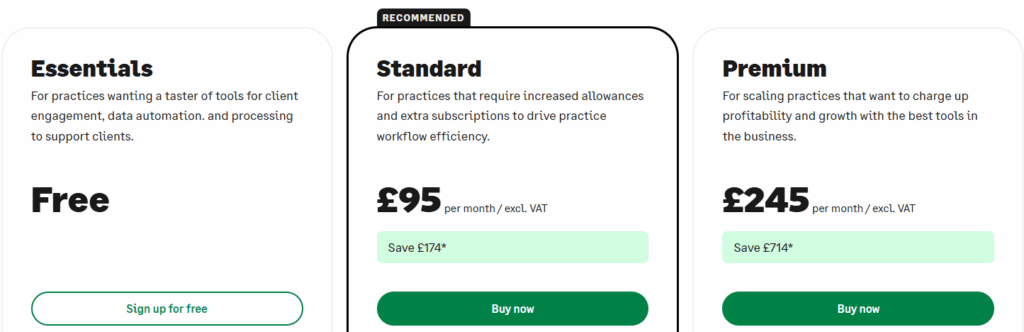
| Essentials | Free | Beginners or small practices wanting a trial run |
| Standard | £95/month (excl. VAT) | Mid-size practices needing better workflows |
| Premium | £245/month (excl. VAT) | Large firms looking for maximum automation and scaling tools |
Notes: Sage’s Standard plan is the most recommended option and comes with more automation and extra subscriptions. The Premium plan, while expensive, offers advanced tools for big teams and more profitability.
✅ Xero Pricing (USD)

| Plan | Original Price | Now (90% Off for 3 Months) | Total Savings (3 Months) | Best For |
|---|---|---|---|---|
| Starter | $29/mo | $2.90/mo | Save $78.30 | Freelancers & basic accounting |
| Standard | $46/mo | $4.60/mo | Save $124.20 | Small businesses needing more features |
| Premium | $69/mo | $6.90/mo | Save $186.30 | Global businesses needing multi-currency |
Notes: Xero’s plans are more budget-friendly compared to Sage. Even the Premium plan costs less than Sage’s Standard plan, making it a great option for startups and small companies.
🎯 Ease of Use: Which One Is Simpler?
| Factor | Xero | Sage |
|---|---|---|
| UI Friendliness | Very easy for non-accountants | More complex & traditional layout |
| Training required | Minimal | Often requires onboarding |
| Learning curve | Fast start | Slower — especially for SMBs |
👉 Xero wins here because it feels like a modern app not old-school accounting software.📱 Mobile App Experience
- Xero Mobile App
Helps you create invoices, capture receipts, check cash flow, and approve payments all on the go. - Sage Mobile App
Functional but not as smooth or intuitive. Some features require desktop access.
👉 If you travel, work remote, or manage finances on mobile Xero is clearly better.
🧩 Integrations & Compatibility
| Capability | Xero | Sage |
|---|---|---|
| Third-party app ecosystem | 1,000+ integrations | Smaller integration library |
| Works well with | Shopify, Stripe, POS tools, CRM systems | Mostly business-management focused |
| Automation strength | High | Medium |
👉 Xero is built to grow with your tech especially if you rely on ecommerce or SaaS tools.
🔐 Security & Data Protection
Both companies take security seriously, but the approach differs:
| Security Feature | Xero | Sage |
|---|---|---|
| Cloud-native encryption | ✔ | ✔ (depends on version) |
| Automatic backups & updates | ✔ Always | ✔ In cloud products only |
| System uptime | Excellent | Varies between cloud vs desktop |
👉 With fully cloud-native architecture, Xero offers stronger reliability and lower IT burden.
“For an in-depth look at how Sage handles payroll especially in the UK context this comprehensive review is very informative.”
👍 Pros and Cons
✅ Xero
✔️ Pros
- Easy to use for beginners
- Access from any device, anytime
- Unlimited users on all plans
- Clean dashboard and simple setup
- Great for online businesses and remote teams
❌ Cons
- Starter plan has strict limits (like 20 invoices/month)
- Some features like payroll and projects cost extra
- Limited offline capabilities
✅ Sage
✔️ Pros
- Great for growing or complex businesses
- Detailed reporting and compliance support
- Offers a free plan to start
- Built-in tools for VAT and payroll
- Available in both cloud and desktop versions
❌ Cons
- High cost, especially the Premium plan
- Interface is less modern
- Learning curve can be steep for beginners
2025 Outlook: Trust, Trends & What Experts Recommend
As of 2025, many industry reviewers still consider Xero the go-to for small and medium businesses “easy, cheaper, quicker, more efficient.”
Meanwhile, as companies grow and accounting needs become complex, Sage (especially its advanced and cloud-ready offerings) becomes more attractive for scalability, control, and enterprise-grade features.
For businesses operating globally or dealing with multi-currency, both software provide support but Xero’s integrations and mobility often make it more flexible.
That said, businesses should carefully review their requirements before choosing migrating accounting software later can be time-consuming. The decision should align with business size, growth plans, regulatory/compliance needs, and internal finance capacity.
🧠 My Recommendation: Which Accounting Software Is Most Trusted in 2025?
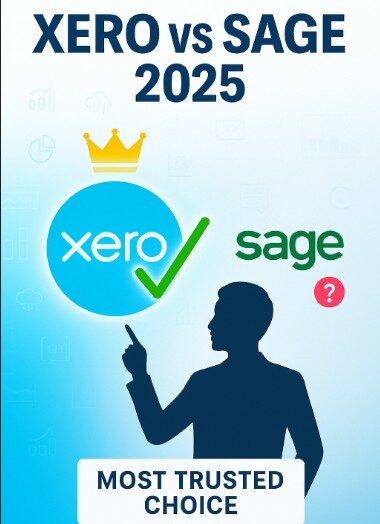
When comparing trust in daily use especially among growing modern businesses Xero clearly leads.
- If you are a freelancer, small business owner, or fast-growing startup, Xero is the smarter and more trusted choice.
- Why? It’s easier to learn, cheaper to maintain, and integrates beautifully with the tools today’s businesses rely on.

- Sage still holds value for larger organizations that already have a full finance team and need deep compliance, industry-specific workflows, or multi-entity structures.
- But that’s a smaller segment.
Most businesses in 2025 need flexibility, simplicity, automation, and cloud access and Xero delivers all of that without complexity.
🏁 Which One Should You Choose?
- Choose Xero if you are a freelancer, startup, or a small business with basic accounting needs.
It’s cost-effective, easy to learn, and has excellent integration options for tools like Stripe, Shopify, and PayPal. You can scale up as your business grows.
- Choose Sage if your business is medium to large, deals with heavy reporting, payroll, and inventory, or has teams that require advanced features.
It’s especially good for UK-based firms that need strong compliance tools and VAT features.
Choosing between Xero and Sage depends on your business size, budget, and how tech-savvy your team is.

Which One is The Winner? (Our Recommendation)
Xero is the WINNER,🎖️ it is the best choice over Sage. It’s flexible, 100% reliable, and made for the way modern businesses work today. Xero accounting software is easy to learn, works from anywhere, grows with your business, and doesn’t break the bank.
✅ Conclusion
Both tools are powerful but the trust factor changes based on the type of business.
- Xero has built a reputation as the modern, easy, scalable solution for small to medium businesses, remote teams, and digital-first companies. It’s more affordable, integrates better with today’s tech stack, and is easier for non-accountants to operate.
- Sage is still excellent for larger, more traditional businesses with internal finance teams and complex compliance needs.
🏆 Clear Winner: Xero
Best overall for 2025 especially for 90% of growing businesses.
Why Xero wins:
- More beginner-friendly reduces dependence on accountants
- Cloud-native design supports remote + hybrid work
- Better integration ecosystem for modern business tools
- Cost-effective for long-term ownership
Sage remains a strong competitor but many businesses that start on Sage eventually move to Xero for flexibility and simplicity.
If you want a future-proof accounting system you won’t outgrow quickly: Choose Xero.
“RELATED ARTICLES”
Xero vs QuickBooks? Don’t Choose Until You Read This!
FreshBooks vs Xero: Which Accounting Software WIN’s?
FAQs
❓1. Can I use Xero or Sage for payroll?
Yes, both offer payroll features Xero includes it as an add-on, while Sage has built-in payroll tools in higher-tier plans.
❓2. Does Xero or Sage support third-party integrations?
Xero supports over 1000 integrations with apps like Stripe and Shopify; Sage offers fewer but works well with Microsoft tools.
❓3. Is my data safe with Xero and Sage?
Yes, both platforms use strong encryption and cloud backups to protect your financial data from unauthorized access.

I’m a CRM and Xero expert with over 6 years of experience. I specialize in researching, testing, and simplifying complex systems like Xero and other CRM tools. From setting up workflows to writing easy-to-understand content, I help businesses choose the right platforms and use them better for real growth.