Managing your business finances shouldn’t feel complicated but for many users, QuickBooks can become expensive, complex, or limiting as your needs grow. 💼
That’s why more businesses are now exploring better, simpler, and more affordable alternatives that offer the same (or even better) features without the hassle.
So the real question is:
👉 Which QuickBooks alternative actually fits your business needs and budget?
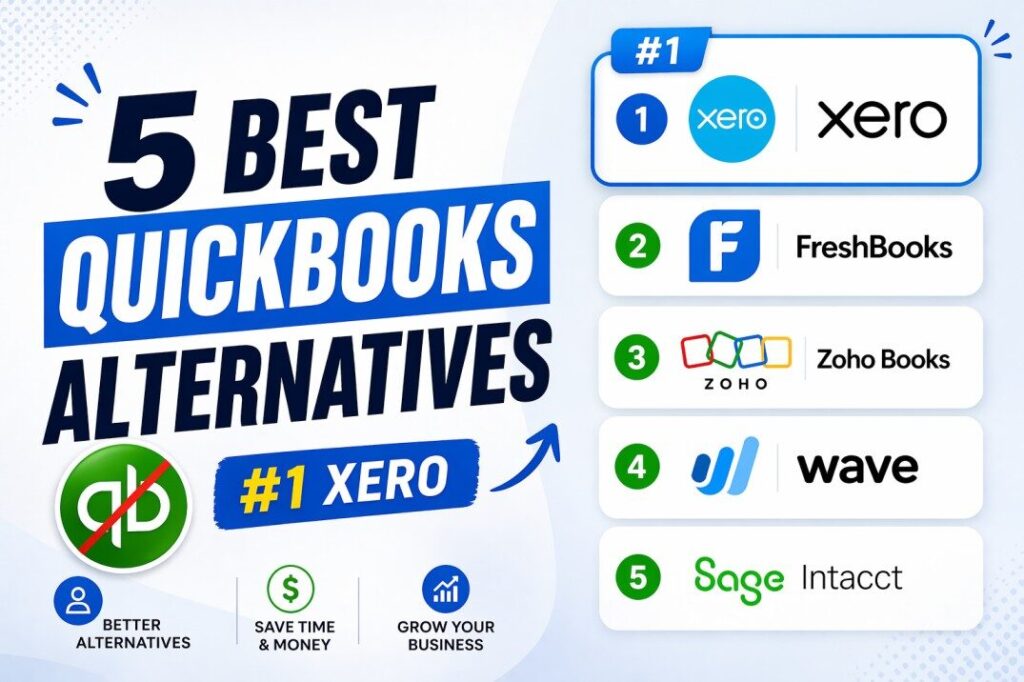
In this guide, we’ll break down the 5 best QuickBooks alternatives from powerful tools like Xero to free options like Wave so you can confidently choose the right accounting software and streamline your finances. 🚀
🤔 What Is QuickBooks & Why Consider Alternatives?
QuickBooks is a comprehensive accounting software suite designed for small to medium-sized businesses. It handles everything from invoicing and expense tracking to inventory management and complex financial reporting, making it a popular “all-in-one” choice.
However, many businesses are now looking beyond it for several key reasons:
💰 Cost Concerns: As businesses grow, QuickBooks’ pricing model can become expensive. The need for add-ons or higher-tier plans can significantly increase monthly costs.
⚙️ Feature Overload: For freelancers and very small teams, QuickBooks can be overkill. Its powerful features may go unused, making a simpler, cheaper alternative more attractive.
📈 Scalability Issues: While great for small businesses, some organizations outgrow QuickBooks, especially if they need to handle multiple entities or currencies, leading them to seek more scalable solutions.
💸 Hidden Costs: Beyond the base subscription, additional fees for payroll, advanced inventory, or extra users can add up, making the total cost of ownership higher than expected.
🌟 Top 5 Best QuickBooks Alternatives in 2026
1️⃣ Xero (Best Overall QuickBooks Alternative)
Xero is a cloud-based accounting platform that has earned its reputation as the leading QuickBooks alternative by combining powerful automation with an exceptionally intuitive user interface. Founded in New Zealand in 2006, Xero now serves over 4.6 million subscribers worldwide and is particularly popular among growing businesses that need robust bank reconciliation, multi-currency support, and clean financial reporting.
Unlike QuickBooks, Xero includes unlimited users on most plans, making it exceptionally cost-effective for teams with multiple people who need access to financial data.
✨ Key Features
- 🤖 AI-Powered Automation – Xero’s new “Accountable Intelligence” framework uses artificial intelligence to automate routine finance tasks like bill analysis, payment setup, and bank reconciliation. The system shows you how it reaches conclusions while leaving the final decision with you.
- 🧾 Smart Data Capture – Using large language models, Xero can read and extract data from receipts and invoices in under 20 seconds, dramatically reducing manual data entry.
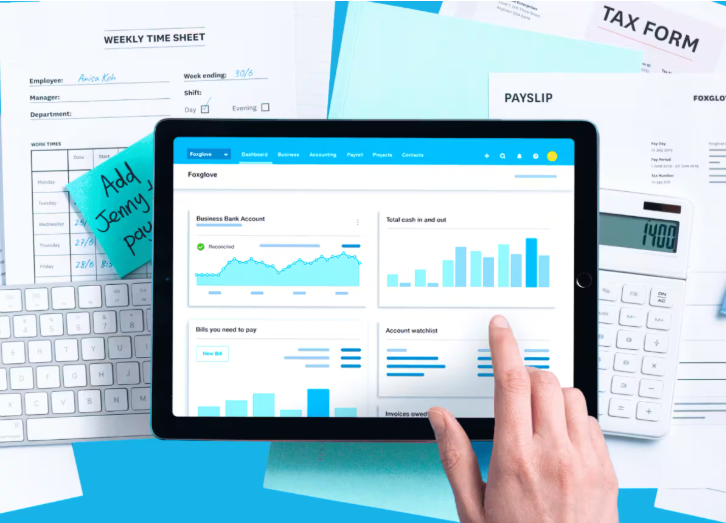
- 🖥️ Real-Time Dashboard – A new widget-driven homepage provides customizable views of profit, cash flow, and pending tasks at a glance, giving business owners instant visibility into financial health.
- 🌍 Multi-Currency Support – Ideal for businesses with international clients, allowing you to send invoices in foreign currencies and track exchange rate gains and losses.
- 🔗 Extensive App Marketplace – Integrates with over 1,000 third-party applications, including CRM systems, e-commerce platforms, and payment gateways.
💰 Xero Pricing (2026)
Xero offers three main plans with a transparent, tiered structure. New customers can get 90% off their first 6 months. All plans include GST tracking, bank reconciliation (beta), Hubdoc integration, real-time reporting, and automated superannuation. Additional users cost $5 per month. The following rates reflect the standard monthly pricing after any introductory discounts:

| Plan | Monthly Price | Invoices/Bills Limit | Key Features |
|---|---|---|---|
| Early | $25 | 20 invoices, 5 bills | Send quotes, accept online payments, enter bills |
| Growing | $55 | Unlimited | Multi-currency, expense tracking, bulk reconciliation |
| Established | $90 | Unlimited | 180-day cash flow forecasts, analytics, project tracking |
✅ Pros
- Intuitive, clean interface that is easy for non-accountants to navigate
- Unlimited users on all plans, allowing your entire team and accountant to collaborate at no extra cost
- Exceptional bank reconciliation engine with AI-powered matching
- Strong mobile app for managing finances on the go
- Scales seamlessly from freelancers to mid-sized businesses
❌ Cons
- Multi-currency support is only available on the Growing and Established plans
- Some advanced reporting features require customization
- Customer support response times can vary during peak periods
- Inventory management is basic compared to dedicated inventory solutions
- Entry-level plan has invoice limits (20 per month), which may be restrictive for some businesses
👥 Best For
Growing businesses, startups, and accounting teams that need a scalable, user-friendly platform with powerful automation and unlimited user access.
2️⃣ FreshBooks (Best for Freelancers & Service-Based Businesses)
FreshBooks is a cloud-based accounting platform built specifically for freelancers and service-based businesses. Unlike QuickBooks, which was designed for product-based companies with inventory, FreshBooks prioritizes time tracking, project management, and professional invoicing the tools that consultants, agencies, and freelancers use every day.
Its intuitive interface and exceptional customer support have made it an Editors’ Choice winner and a favorite among over 30 million users worldwide.
✨ Key Features
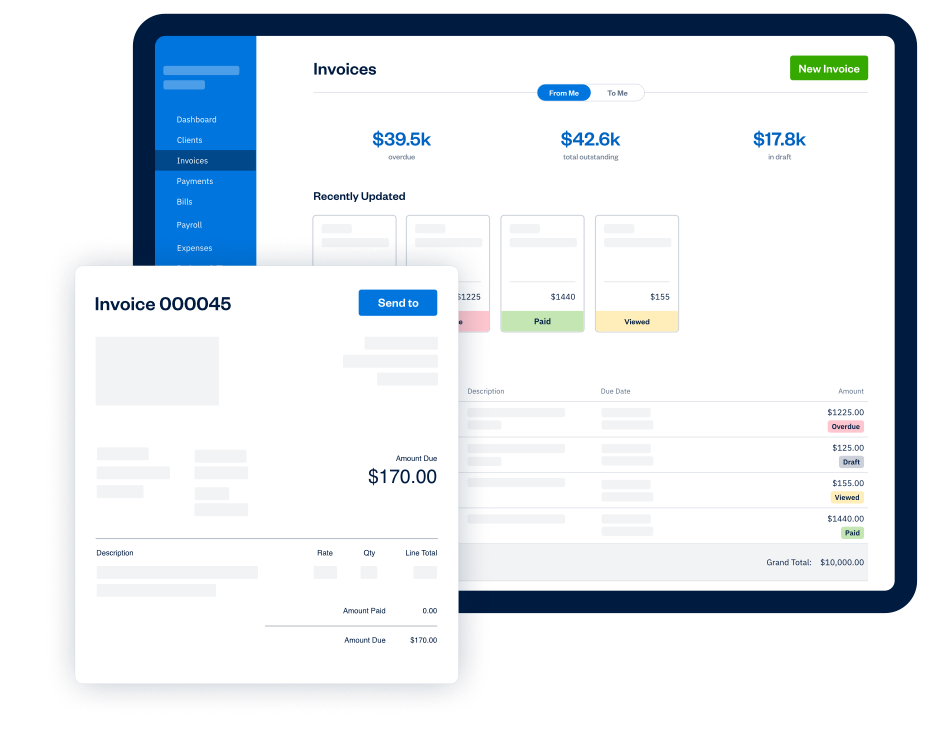
- ✉️ Professional Invoicing – Create and send branded, professional invoices with automated payment reminders and late-payment follow-ups. FreshBooks’ invoicing is widely considered the best in the industry.
- ⏱️ Built-in Time Tracking – Track billable hours effortlessly using a timer or manual entry, then add them directly to client invoices. This eliminates the tedious process of reconciling timesheets with billing.
- 🛠️ Project Management – Manage projects from start to finish, collaborate with team members, share files, and keep all financial and project data in one centralized location.
- 📑 Tax-Ready Reports – Generate detailed financial reports like Profit & Loss, Expense reports, and Sales Tax summaries to make tax time significantly easier.
- 💳 Online Payments – Accept credit cards and ACH bank transfers directly through invoices, with funds deposited directly into your bank account.
💰 FreshBooks Pricing (2026)
FreshBooks uses a tiered pricing model based on the number of billable clients. Annual billing saves approximately 10%, and all plans include a 30-day free trial. Additional team members cost $11 per month each.

| Plan | Monthly Price | Billable Clients | Key Features |
|---|---|---|---|
| Lite | $6.90 | Up to 5 | Unlimited estimates & invoices, expense tracking, client portal, recurring invoices |
| Plus | $12.90 | Up to 50 | All Lite features, plus unlimited project proposals, client retainers, and team member access |
| Premium | $21.00 | Unlimited | All Plus features, plus advanced reporting and lower credit card transaction fees |
| Select | Custom | Custom | All Premium features, plus 1:1 dedicated support and exclusive access to lower payment processing fees |
✅ Pros
- Exceptionally user-friendly interface, rated 4.5/5 for ease of use
- Outstanding invoicing capabilities with automated follow-ups
- Built-in time tracking that seamlessly populates invoices
- Highly responsive customer support available via phone, email, and chat
- Excellent for service-based businesses that bill by the hour or project
❌ Cons
- Not suitable for product-based businesses with inventory needs
- Per-client billing limits on lower plans can restrict growth
- More expensive per-user compared to some competitors
- Limited third-party integrations compared to Xero
- Lacks advanced features like purchase orders and multi-currency support on lower tiers
👥 Best For
Freelancers, solopreneurs, and service-based businesses such as marketing agencies, consultants, designers, contractors, and accountants.
3️⃣ Zoho Books (Best Affordable Alternative with Integrations)
Zoho Books is a feature-rich, cloud-based accounting platform that offers exceptional value, especially for businesses already using other Zoho products. It’s known for its powerful automation, deep integration with the 40+ app Zoho ecosystem, and a generous free plan that makes it accessible to bootstrapped startups.
Unlike QuickBooks, Zoho Books provides a clear upgrade path from free to enterprise-level plans, allowing businesses to grow without switching platforms.
✨ Key Features
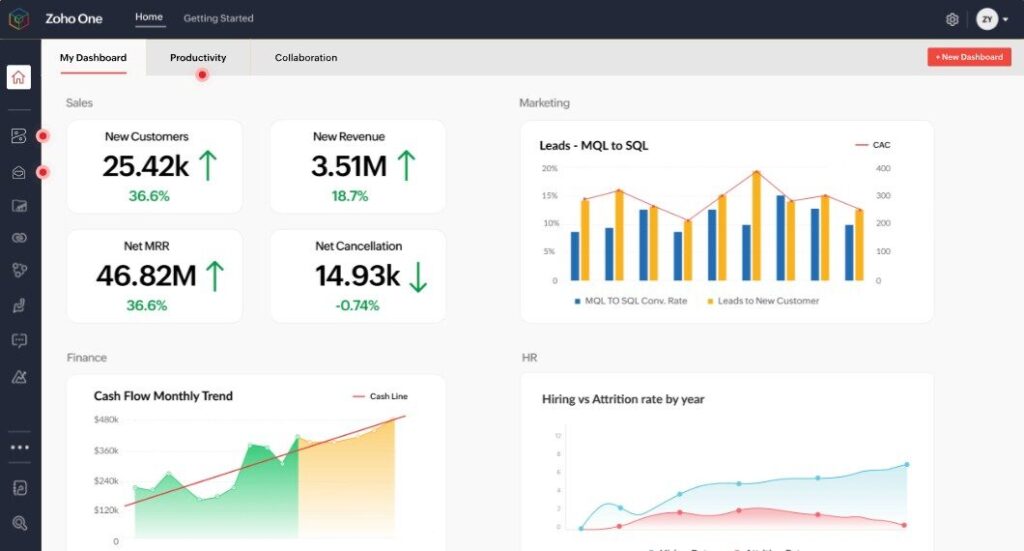
- 🔄 Deep Ecosystem Integration – Integrates natively with Zoho CRM, Zoho Inventory, Zoho Desk, and over 20 other Zoho applications, creating a unified business management suite where data flows seamlessly between sales, support, and accounting.
- ⚡ AI-Powered Automation – Uses AI agents for efficient bank reconciliation, and the “Quick Categorize” feature allows you to categorize up to 50 bank transactions at once in a spreadsheet-like view, saving hours of manual work.
- 🏷️ Advanced Reporting Tags – Create custom tags for transactions and line items to filter and track data with precision, enabling deeper financial insights tailored to your specific business needs.
- 🌐 Global Business Ready – Supports 22 languages, 180 currencies, and offers automated tax compliance features, including direct GST filing for international and Indian businesses.
- 📦 Inventory Management – Advanced inventory tracking with SKUs, purchase orders, vendor management, and reorder points—features that QuickBooks locks behind higher-tier plans.
💰 Zoho Books Pricing (2026)
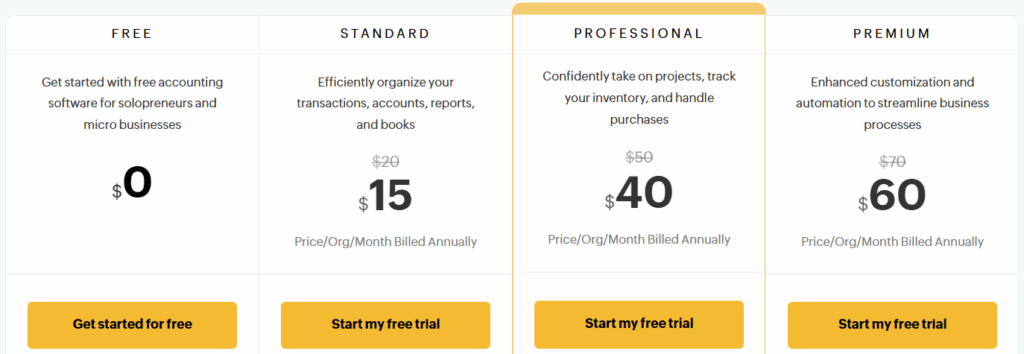
Zoho Books offers six pricing tiers, including a free plan that supports one user and one accountant, making it one of the most accessible accounting solutions available.
| Plan | Monthly Price (Billed Annually) | Users | Key Features |
|---|---|---|---|
| Free | $0 | 1 user + 1 accountant | Basic accounting, invoicing, bank reconciliation, mileage tracking |
| Standard | $10 | Up to 3 users | Connect bank feeds, custom reporting, bill management |
| Professional | $21 | Up to 5 users | Multi-currency, inventory tracking, purchase orders |
| Premium | $41 | Up to 10 users | Cash flow forecasting, enhanced automation, custom domain |
| Elite | $70 | Up to 15 users | Warehouse management, advanced inventory, sales channel integration |
| Ultimate | $150 | Up to 25 users | Enterprise analytics, custom modules, dedicated support |
✅ Pros
- Extremely affordable, with a powerful free plan that includes email support
- Seamless native integration with the entire Zoho ecosystem (CRM, Inventory, Desk, etc.)
- Scales smoothly from free plan to enterprise tier without platform migration
- Advanced inventory and automation features included at lower price points than competitors
- Supports 22 languages and 180 currencies, making it truly global
❌ Cons
- Interface can feel less modern and more cluttered compared to Xero or FreshBooks
- Some advanced reports require setup and customization
- Customer support is primarily online, which can be slower than phone support
- The depth of features can be overwhelming for very new users
- Additional users beyond plan limits require paid upgrades
👥 Best For
Budget-conscious small businesses, startups, and any company already using Zoho CRM or other Zoho applications who need a scalable, highly integrated accounting solution.
4️⃣ Wave Accounting (Best Free QuickBooks Alternative)
Wave is a revolutionary platform that offers completely free, double-entry accounting software, making it a phenomenal option for bootstrapped businesses and freelancers. Its core accounting features are available at no cost forever, with revenue generated from optional paid add-ons like payment processing and payroll.
While it lacks the advanced features of paid platforms, Wave’s free plan is surprisingly robust and includes unlimited invoicing, expense tracking, and bank connections making it the perfect starting point for very small businesses.
✨ Key Features
- 🆓 Completely Free Core Accounting – The Starter Plan is free forever and includes double-entry accounting, unlimited expense tracking, customizable invoicing, bank reconciliation, and basic financial reporting.
- ✉️ Unlimited Invoicing – Create and send unlimited, branded invoices to unlimited clients. Accept credit card and bank payments online for a small transaction fee (2.9% + $0.60 per transaction).
- 🏦 Bank Connections – Connect unlimited bank and credit card accounts to automatically import and categorize transactions, saving hours of manual data entry.
- 📱 Receipt Scanning – Snap a photo of your receipts, and Wave’s software will scan and categorize them (available on the Pro plan).
- 📈 Essential Financial Reports – Generate Profit & Loss statements, Balance Sheets, and Cash Flow Statements to understand your business’s financial health.
💰 Wave Accounting Pricing (2026)
| Plan | Monthly Price | Key Features |
|---|---|---|
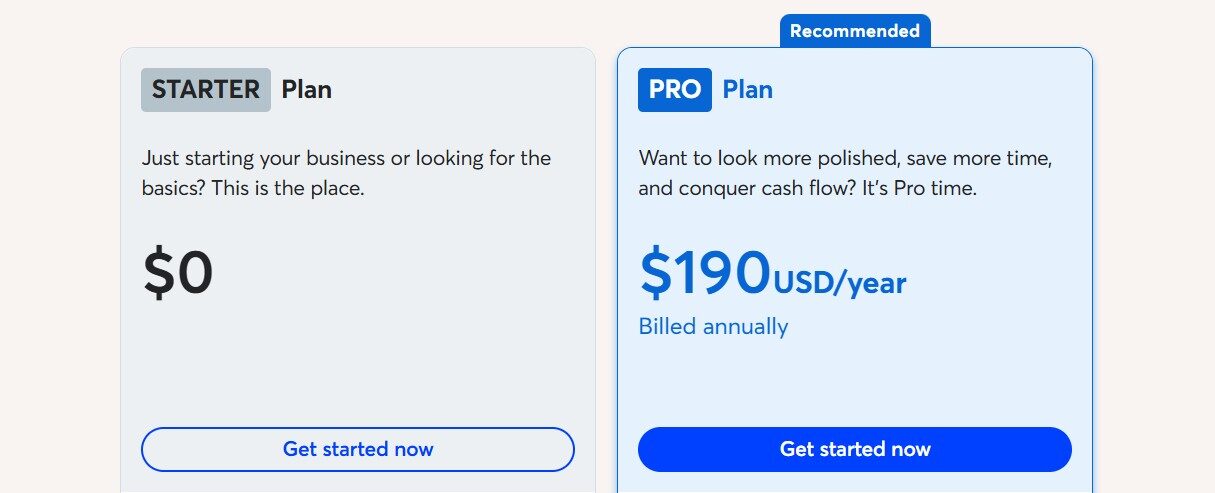
| Starter | $0 | Unlimited invoicing, expense tracking, bank connections, basic financial reports, double-entry accounting |
| Pro | $190 | All Starter features, plus automatic bank transaction imports, receipt scanning, and late payment reminders |
Add-on Services (additional costs):
- Payroll – Starting at $40/month + $6 per employee (available in 14 states with full tax filing)
- Payment Processing – 2.9% + $0.60 per credit card transaction; 1% per bank transfer (ACH) transaction
✅ Pros
- Completely free core accounting with no time limits or hidden fees
- Unlimited invoicing to unlimited clients, unlike paid competitors that cap client counts
- Unlimited bank connections and expense tracking
- Professional, customizable invoice templates
- Mobile apps for invoicing and receipt tracking on the go
❌ Cons
- Lacks advanced features like inventory management, time tracking, and project profitability
- Payroll is a paid add-on and only available in 14 states (AZ, CA, FL, GA, IL, IN, MN, NY, NC, TN, TX, VA, WA, WI)
- No built-in third-party integrations, limiting connectivity with other business tools
- No live support unless you pay for the Pro plan or another paid service
- No audit trails, which may be a concern for businesses with compliance requirements
👥 Best For
Freelancers, solopreneurs, and very small service-based businesses with straightforward accounting needs and tight budgets who don’t require advanced features like inventory or time tracking.
5️⃣ Sage Intacct (Best for Mid-Sized & Growing Businesses)
Sage Intacct is a cloud-native, best-in-class financial management and ERP (Enterprise Resource Planning) solution built for sophisticated, growing businesses and enterprises that have outgrown entry-level platforms like QuickBooks.
Unlike QuickBooks, which can struggle with multi-entity consolidation and complex financial structures, Sage Intacct is purpose-built to handle multiple entities, currencies, and locations with ease. It’s the platform of choice for businesses exceeding $5 million in annual revenue that need real-time reporting, deep automation, and robust financial controls.
✨ Key Features
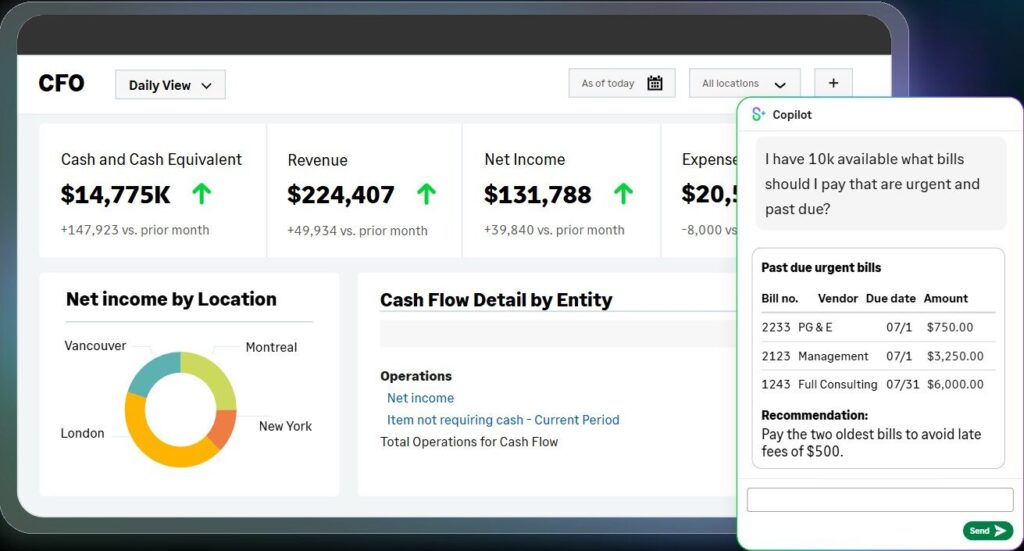
- 🏢 Multi-Entity & Global Management – Purpose-built to handle complex financial structures, including multiple legal entities, subsidiaries, locations, currencies, and inter-entity transactions with automated consolidation.
- 🧠 AI-Driven Finance – Includes an AI-powered import agent and “Finance Intelligence Agent” for predictive analytics, anomaly detection, and automated insights that help finance teams work smarter.
- 🔗 Real-Time Integration – Offers a comprehensive REST API and native integration with major BI (Business Intelligence) tools like Tableau and Power BI for deep, real-time data analysis.
- ⚙️ Workflow Automation – Features robust automation for accounts payable (including line-level invoice matching), approval workflows, and close management to dramatically speed up financial cycles.
- 📄 Paperless Processes – Includes powerful document management features to capture, index, route, and store documents in a single, secure repository, reducing paper and improving audit trails.
💰 Sage Intacct Pricing (2026)
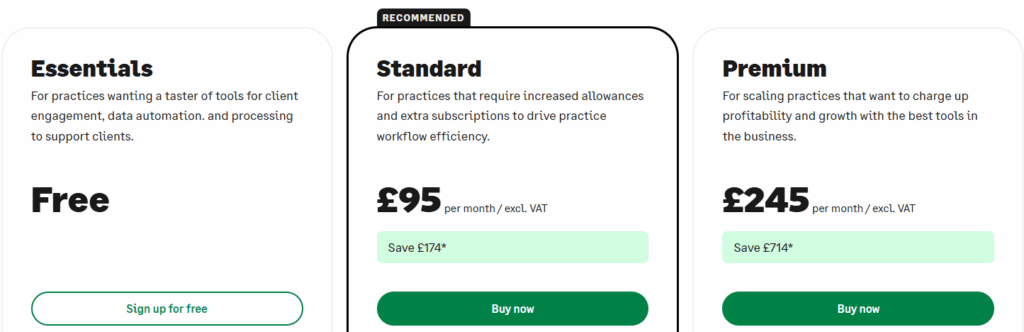
Sage Intacct does not publish standard pricing, as costs are customized based on users, entities, and required modules. Quotes are provided after a consultation. The following ranges are based on industry data.
| Cost Component | Typical Range | Notes |
|---|---|---|
| Base Annual Subscription | $12,000 – $35,000 | Includes Core Financial Management (GL, AP, AR, cash management) for one business user |
| Per-User Licensing | $150 – $400/user/month | Full business users with complete access; limited “Employee User” packs available at lower cost |
| Additional Modules | $3,000 – $10,000+ per module/year | Project accounting, revenue recognition, multi-entity consolidation, inventory management |
| Implementation Fees | $25,000 – $100,000+ | One-time cost for setup, data migration, configuration, and training |
| Typical Annual Total (10 users) | $50,000 – $120,000 | Includes base subscription, user licenses, and essential modules |
✅ Pros
- Unmatched scalability for growing enterprises with multi-entity or global operations
- Deep financial management with robust automation for complex workflows
- Real-time reporting and dashboards with drill-down capabilities
- Strong integration capabilities with major CRM, BI, and HR systems
- Purpose-built for industries like professional services, nonprofits, healthcare, and financial services
❌ Cons
- Pricing is complex and not transparent; requires a sales consultation for a quote
- Implementation and setup costs are significant, often equal to or greater than the first year’s subscription
- Best suited for businesses with dedicated finance teams; overkill for small businesses
- Requires time and expertise to configure properly
- Not designed for businesses under approximately $5 million in annual revenue
👥 Best For
Mid-sized to large enterprises, rapidly growing companies, and any organization with complex financial needs such as multi-entity consolidation, global operations, or advanced revenue recognition requirements.
⚖️ Quick Comparison: Top Alternatives at a Glance
| Platform | Best For | Starting Price | Free Version | Key Strength |
|---|---|---|---|---|
| Xero | Overall best alternative | $25/month | Trial | Unlimited users, AI automation |
| FreshBooks | Freelancers & service pros | $23/month | No (30-day trial) | Exceptional invoicing & time tracking |
| Zoho Books | Affordable & integrated | $0 (Free plan) | Yes | Value for money, ecosystem integration |
| Wave | Free accounting | $0 (Free plan) | Yes | Unbeatable price for core features |
| Sage Intacct | Mid-sized & enterprises | Quote-based ($12k+/year) | Trial | Multi-entity, robust automation |
🎯 How to Choose the Right QuickBooks Alternative
📝 Assess Your Business Type – Are you a freelancer billing by the hour? FreshBooks is ideal. Do you sell products with inventory? Xero or Zoho Books are better suited. Do you have multiple entities or global operations? Sage Intacct is the answer.
💰 Evaluate Your Budget – Consider not just the monthly fee but also add-ons and per-user costs. Wave is perfect for a tight budget, while Zoho Books offers a powerful free plan.

👥 Consider Team Size – Xero includes unlimited users on all plans, making it cost-effective for teams. Zoho Books and FreshBooks charge per additional user.
🔌 Check Integrations – If you use other software (like a CRM or e-commerce platform), ensure the accounting software integrates with it. Zoho Books excels for Zoho users; Xero has the broadest marketplace.
🌍 Think About Growth – Choose software that scales with you. Xero and Zoho Books offer tiered upgrades; Sage Intacct is for those who need serious enterprise scale.
✅ Key Features to Look for in Accounting Software
- Double-Entry Accounting – Ensures your books are always balanced and audit-ready.
- Bank Reconciliation – Automatically matches your transactions with bank feeds to save time and reduce errors.
- Invoicing & Payments – Allows you to create, send, and track invoices and accept online payments.
- Financial Reporting – Generates essential reports like Profit & Loss, Balance Sheets, and Cash Flow Statements.
- Expense Tracking – Categorizes business expenses for easy write-offs and tax preparation.
- Tax Compliance – Handles sales tax, VAT, or GST automatically based on your location.
💡 Benefits of Using QuickBooks Alternatives
💰 Cost Savings – Many alternatives offer more affordable or flexible pricing structures, including free plans.
🎨 Specialized Features – Find a platform perfectly tailored to your business type, whether you’re a freelancer, retailer, or global enterprise.
📈 Better Scalability – Many modern solutions are built to grow with you, offering clear upgrade paths without platform migration.
👍 Improved Usability – Alternatives often prioritize user experience, making accounting accessible to non-accountants.

⚠️ Common Mistakes to Avoid When Switching from QuickBooks
- 💾 Not Exporting Historical Data – Before canceling QuickBooks, ensure you have exported all your financial records and tax documents for your records.
- ⏰ Switching Mid-Year – This can complicate tax filings. It’s often best to make the switch at the beginning of a fiscal quarter or year.
- 🚫 Ignoring Integrations – Failing to check if your new platform integrates with your bank, CRM, or other key tools can create new manual processes.
- 😤 Underestimating the Learning Curve – Even intuitive software requires time to learn. Set aside time for training and data migration.
🏆 Final Verdict: Best QuickBooks Alternative in 2026
After evaluating pricing, features, usability, and scalability, here is our final verdict:
🏆 Best Overall QuickBooks Alternative – Xero wins for its combination of powerful features, unlimited users, AI-driven automation, and intuitive interface that works for businesses of all sizes.
🎨 Best for Freelancers & Service Pros – FreshBooks remains unmatched with its exceptional invoicing, built-in time tracking, and project management features.
💰 Best Value & Free Plan – Zoho Books offers an incredible feature set for the price, including a generous free plan and seamless Zoho ecosystem integration.
🆓 Best Free Accounting – Wave is the champion for bootstrapped businesses that need core accounting features without any monthly cost.
🏢 Best for Mid-Sized & Enterprises – Sage Intacct is the clear choice for growing businesses with complex financial needs, multi-entity structures, or global operations.
The best choice ultimately depends on your business size, type, and budget. Take advantage of free trials, list your priorities, and choose the partner that will help you manage your finances with confidence.
Related Articles:- 5+ Best Xero Alternatives 2026 [1st One is Most Trusted]
❓ FAQs
1. Is there a completely free alternative to QuickBooks?
Yes. Wave Accounting offers a completely free Starter Plan that includes unlimited invoicing, expense tracking, bank connections, and basic financial reporting.
2. What is the easiest QuickBooks alternative for a freelancer?
FreshBooks is widely considered the easiest and most intuitive, especially for freelancers who need to track time and bill clients professionally.
3. Which QuickBooks alternative is best for inventory management?
Both Zoho Books (Professional plan and above) and Xero (with third-party integrations) offer solid inventory management features, including SKUs, purchase orders, and vendor management.
4. Can I switch from QuickBooks to Xero?
Yes. Xero provides free data migration tools and support to help you import your existing QuickBooks data smoothly.
5. Why would I switch from QuickBooks?
Common reasons include high and rising costs, feature overload, poor customer support experiences, and the need for a platform that scales differently or integrates better with other business tools.

I’m a CRM and Xero expert with over 6 years of experience. I specialize in researching, testing, and simplifying complex systems like Xero and other CRM tools. From setting up workflows to writing easy-to-understand content, I help businesses choose the right platforms and use them better for real growth.